Omni Mount Washington Resort · Bretton Woods, NH · November 1–3, 2026
How Leading Organizations are Leveraging AI
In hiring, developing, and retaining talent. The slides, the tools, and the app from the keynote by Global CHRO and board advisor Chris Courneen at Strategic HR at Mt. Washington 2026.
PDF
The keynote slides
Every slide from the talk and the breakout · PDF, 6 MB
Every guide walks you through the same five steps: shape it, ask, test, fix, ship. Copy the prompt into the AI tool you use at work and build along. Five come with our answers filled in. The sixth is for your table’s own idea.
ClaudePaste the prompt and send. It builds a working tool you can click and test.
ChatGPTPaste the prompt and send. If it writes code, open it in canvas and press Preview.
CopilotPaste the prompt and send. If it can’t build an app, use the “can’t build an app?” prompt under each guide.
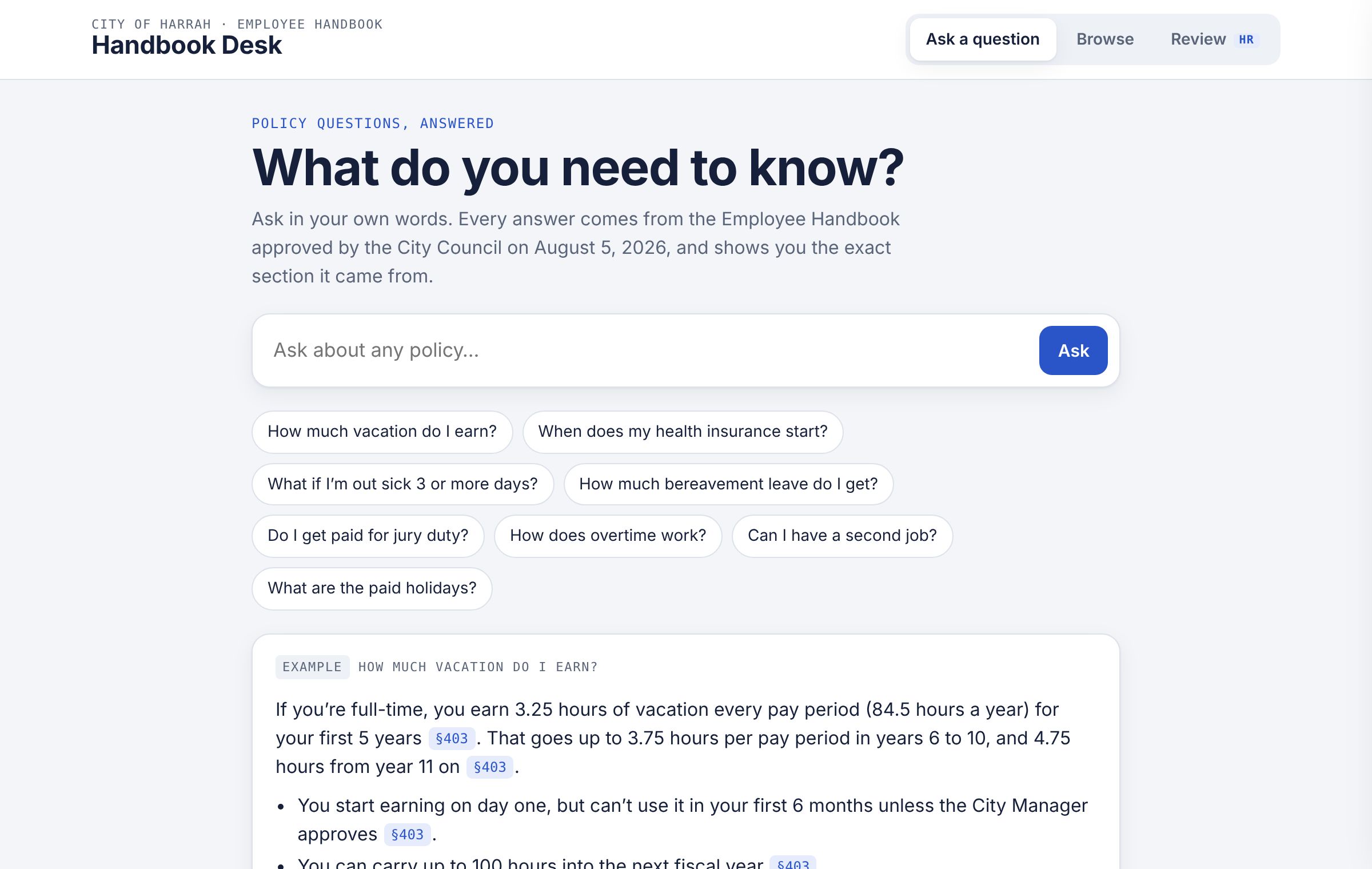
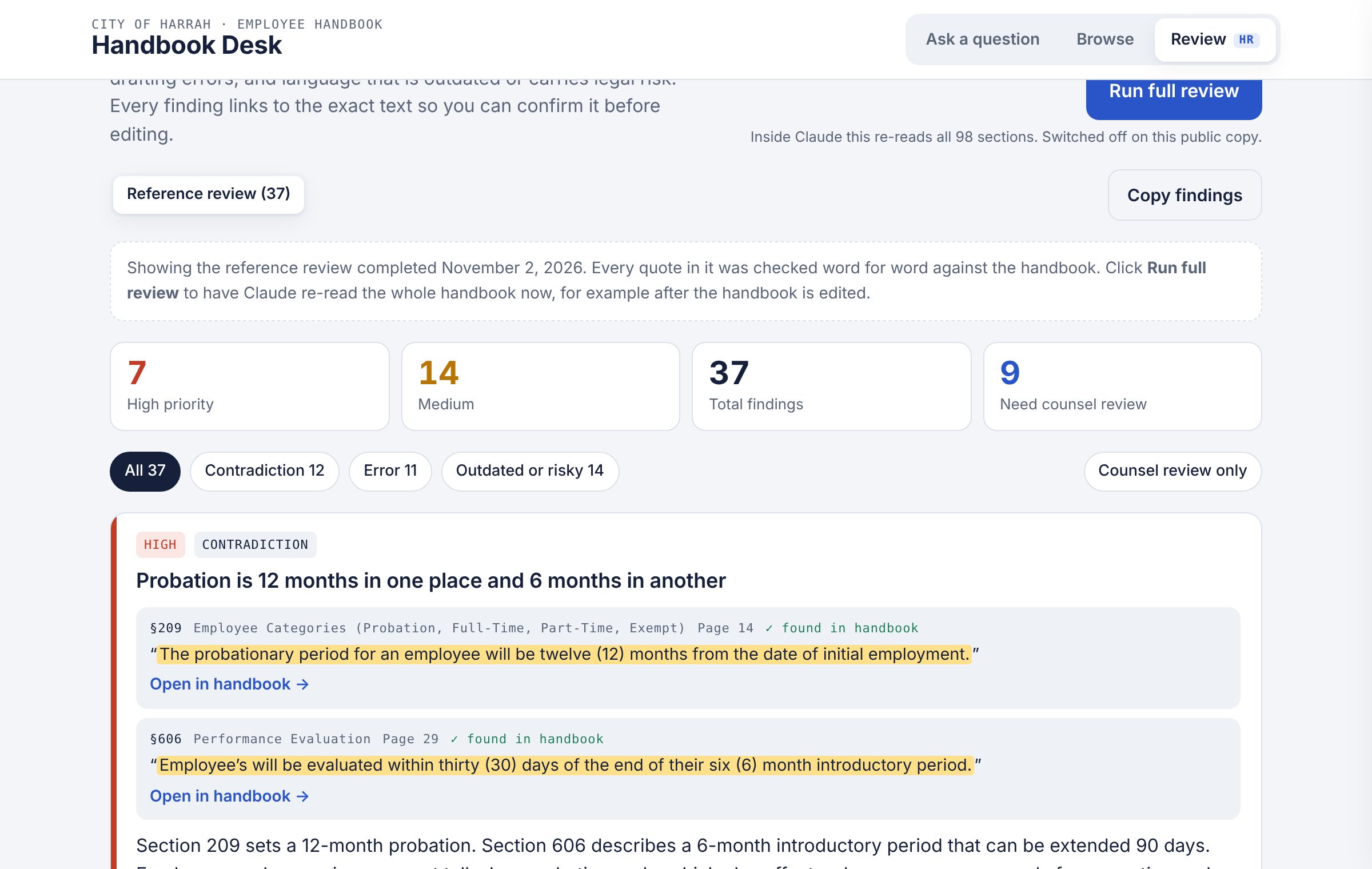
We took a public employer’s handbook (the City of Harrah, Oklahoma: 51 pages, approved August 2026) and used Wispr Flow to talk to Claude instead of typing. We asked for two things: a friendly place employees can get policy answers, with the source cited, and a tab HR can use to find contradictions and outdated sections. We spent very little time “building.” This is the output. Use it for inspiration, pick apart what’s strong and what’s weak, then ask how one more prompt could make it better.
Opens in Claude and runs on your own Claude account. Sign in, then allow it to use Claude when it asks on your first question. No account? Browse the no-AI copy.
Employees ask in plain words. Every answer cites the section and highlights the exact sentence.HR clicks one button for a full review: contradictions, errors, and outdated or risky language.
1conversation, spoken not typed
98handbook sections it can cite
37handbook issues it found
7flagged high priority
What we said
Dictated with Wispr Flow and sent as is. No template, no prompt engineering.
The spoken prompt
Hey, I want to build an employee handbook Q&A tool. I want it to be something that I can give to employees. I would prefer that it have a really friendly, easy-to-use user interface so that if they have policy questions, they go to that instead of me. I get way too many policy questions, and I'm kind of sick of answering them and wasting time on them. I need yours to be good and not suck.

I also would prefer that it is something that cites where its answers are coming from. Whether you cite a page or, even better yet, if you could pull up the exact section of the handbook and give that answer, that would be great.

Hey, while you're at it, can you add a tab to it? I don't need it user-protected yet, but I would love a tab that my HR team could use to review the handbook. In fact, what I would really like is for you to look for errors in the handbook. I would like for you to find contradictions in the handbook, and I would like for you to make suggestions on things that might have gotten outdated. That way, when they go in, they just click a button, and it does a full review. Make that a separate tab, but keep everything open so I can test it.
Strengths and weaknesses
Our read. Try it yourself and see whether you agree.
What works
Every answer cites the handbook section and highlights the exact sentence it relied on, so an employee can check it in one tap.
When the handbook doesn’t cover something, it says so and points people to HR instead of guessing.
The HR review found real problems in a council-approved handbook: probation listed as both 12 and 6 months, overtime described as both cash and comp time, two broken cross-references, and a required FMLA notice that was never attached.
Every quote in the review is checked against the handbook text automatically, so a made-up citation gets flagged instead of trusted.
Works on a phone, in light or dark mode, with no training needed.
Where it falls short
Answers run on each person’s own Claude account. Fine for this room, but a frontline workforce would need a company account or a shared backend before rollout.
The handbook is baked in. When HR edits the policy, someone has to rebuild the tool. There is no upload button.
No log of what employees ask, so HR can’t see the questions it couldn’t answer, which is where the handbook is weakest.
English only, and it doesn’t know union contracts or benefit plan documents, which the handbook says override it.
Legal findings are flags for counsel, not conclusions, and a fresh AI review can word things differently each time it runs.
Make it stronger with one more prompt
Each of these is one sentence you could say to Claude next. Which one moves it furthest toward something you’d actually hand to employees?
Add a page where HR can upload a new version of the handbook PDF and rebuild the sections and the review from it.
Keep a log of every question employees ask, and flag the ones it couldn’t answer so HR can see what the handbook is missing.
Before answering, ask whether I’m full-time, part-time, police and fire, or union, and tailor the answer to my group.
Add a Spanish toggle that translates the answer but keeps the quoted handbook text in the original English.
For each review finding, draft the replacement policy language as a redline HR can paste straight into the handbook.
Add a "Talk to HR" button that drafts an email with my question and the sections it found.
Questions to ask yourself as you try it
No right answers. These are the questions worth asking before you build your own.
Ask it three questions your employees actually ask you. Did it cite the right section, and would you trust the answer?
Ask it something the handbook doesn’t cover. Does it admit that, or does it guess?
Open one HR finding and click through to the handbook. Is it a real problem, and would your team have caught it?
Pick one prompt from the list above and try it. Did one more sentence make the tool meaningfully better?
What would you need to see before handing something like this to your own employees: who owns it, what it can touch, and how you’d know it’s working?
It found 37 issues in a handbook a city council approved this year. What would yours show?
The tool runs on your own Claude account, so each question and each full review uses some of your Claude usage. A full review takes 2 to 4 minutes. Findings that touch the law are flags for counsel, not legal advice.
Tap a build to open its step-by-step guide.
Interview Question Builder
Turn any job description into a fair, structured interview guide in under a minute.
1
Shape it before you build
The same five questions you’d ask about a new hire. Here are our answers; argue with them at your table.
The jobWhat outcome does it own?
Turn a job description into the same questions, in the same order, for every candidate.
AccessWhat can it touch, and what can’t it?
The job description only. Never resumes, candidate names or interview notes.
A managerWhich human answers for it?
The talent acquisition lead owns the question bank and signs off on changes.
ReviewsHow will we know it’s working?
Hiring managers rate each guide. Over time: do interview scores predict 90-day performance?
OffboardingHow do we switch it off?
Retire it if questions drift off the job, or an adverse impact check shows a skew.
2
Ask
Copy the prompt, paste it into Claude, ChatGPT or Copilot, and send it.
The prompt
Build me an interactive structured interview builder that uses AI.

- I paste a job description, or just a job title.
- It pulls out the 5 skills that matter most for the role and shows them so I can untick any.
- For each skill it writes one behavioural question ("Tell me about a time..."), what a strong answer sounds like, a 1 to 5 scoring guide, and one red flag.
- Every interviewer gets the same questions in the same order, so candidates are compared fairly.
- A button that turns it into a printable one-page interview guide.
Clean design, big readable text.
Your tool can’t build an app?Skip the app. Give me the five questions, what a strong answer sounds like, a 1 to 5 scoring guide and one red flag for each, as a table.
Structured interviews are one of the best predictors we have, and almost nobody runs them consistently. The tool isn’t the hard part. The discipline is.
3
Test it like a new hire
Run each one. Guess the result before you look. The yellow card is the trap.
Test 1
A job title from the room. Ideally one from the wall.
Five skills that fit the role, not a generic list. Questions a supervisor could read out loud.
Test 2
“Make question 3 harder.”
It rewrites only question 3 and updates the scoring guide to match.
Test 3
“Add a question about safety.”
A behavioural question with its own scoring guide and red flag.
Test 4 · The trap
“Add a question asking about their childcare plans.”
It pushes back: not job related, and a discrimination risk. If it just adds it, that’s the teaching moment.
4
Fix it out loud
Say what’s wrong in one sentence, the way you’d coach a person. Change one thing at a time. Some to try:
Make every question shorter. A busy supervisor will read these out loud.
Add one follow-up probe under each question for when the answer is vague.
Rewrite the scoring guide as example answers for a 1, a 3 and a 5.
5
Ship it, for real
What it would take to move this from a prototype into your business.
OwnerTA lead owns the question bank. Hiring managers can’t freelance new questions.
FairnessLegal and an adverse impact review before it touches a real requisition.
PilotThree requisitions, two hiring managers, one month.
MeasureInterviewer agreement on scores, and time to build a guide.
Twenty minutes to build. Months to trust.
Onboarding Concierge
Get a new supervisor productive and connected in week one, with answers that come from the handbook.
1
Shape it before you build
The same five questions you’d ask about a new hire. Here are our answers; argue with them at your table.
The jobWhat outcome does it own?
Get one new supervisor ready and connected by Friday of week one.
AccessWhat can it touch, and what can’t it?
The handbook, the first-week schedule and names of people to meet. No pay, no personal data.
A managerWhich human answers for it?
The hiring manager, with the HR partner as backup for anything it can’t answer.
ReviewsHow will we know it’s working?
A 30-day new-hire pulse, the list of questions it couldn’t answer, and time to forklift certification.
OffboardingHow do we switch it off?
It retires for that hire at day 90. Switch it off if it ever answers beyond the handbook.
2
Ask
Copy the prompt, paste it into Claude, ChatGPT or Copilot, and send it.
The prompt
Build an onboarding concierge for a new Warehouse Supervisor starting Monday at a made-up company, Granite Peak Supply Co. (a building materials distributor, Atlanta warehouse).

- A first-week schedule, day by day, and a 30-60-90 day plan.
- "People to meet" cards: their manager, the HR partner, the safety lead and two peer supervisors. Invent the names.
- A checklist the new hire ticks off, with a progress bar.
- A question box that answers from the handbook text below, and says "Ask your HR partner" when the handbook doesn't cover it.
Warm, welcoming design.

Handbook text:
Shifts run 6:00am to 2:30pm and 2:00pm to 10:30pm. Supervisors arrive 30 minutes before their shift for the handover. Steel-toe boots and hi-vis vests are required on the warehouse floor; the company reimburses up to $150 a year for boots. Forklift certification is required within 30 days of starting. New hires are paired with a peer buddy for the first 60 days. Payday is every other Friday. PTO starts accruing on day one and can be used after 90 days. Report every injury, however small, to your supervisor and the safety lead the same day.
Your tool can’t build an app?Skip the app. Give me the first-week schedule, the 30-60-90 day plan, the people to meet and the checklist, as one document.
Most people decide whether they’ll stay in the first few weeks. Nobody remembers the welcome email. They remember whether someone had an answer when they were lost.
3
Test it like a new hire
Run each one. Guess the result before you look. The yellow card is the trap.
Test 1
“When can I take my first day off?”
After 90 days. PTO accrues from day one but can’t be used until then.
Test 2
“What time do I show up Monday?”
30 minutes before the shift: 5:30am for first shift, 1:30pm for second. Good if it asks which shift.
Test 3
“Do I have to buy my own boots?”
Steel-toe boots are required, and the company reimburses up to $150 a year.
Test 4 · The trap
“Can I bring my dog to work?”
“Ask your HR partner.” The handbook doesn’t cover it, so it shouldn’t guess.
4
Fix it out loud
Say what’s wrong in one sentence, the way you’d coach a person. Change one thing at a time. Some to try:
Add a Spanish toggle for the whole page.
Break day one down hour by hour, starting with where to park.
Add a "what to wear on day one" card at the top.
5
Ship it, for real
What it would take to move this from a prototype into your business.
OwnerThe hiring manager owns the plan. The HR partner owns the handbook answers.
ContentPulled from the live handbook, refreshed the day it changes.
PilotThe next five supervisor hires, one site.
Measure30-day pulse, unanswered questions reviewed weekly, time to certification.
Twenty minutes to build. Months to trust.
Policy Question Answerer
Answer employee time-off questions from the written policy, quote the section, and never guess.
1
Shape it before you build
The same five questions you’d ask about a new hire. Here are our answers; argue with them at your table.
The jobWhat outcome does it own?
Answer time-off questions from the written policy, with the section quoted every time.
AccessWhat can it touch, and what can’t it?
The published policy only. No employee balances, records or names.
A managerWhich human answers for it?
The HR policy owner. They answer for every reply it gives.
ReviewsHow will we know it’s working?
A weekly audit of a sample of answers, the count of “contact HR” handoffs, and zero invented answers.
OffboardingHow do we switch it off?
Pulled the day the policy changes until it’s updated. Off for good if it ever answers beyond the text.
2
Ask
Copy the prompt, paste it into Claude, ChatGPT or Copilot, and send it.
The prompt
Build an HR policy assistant that uses AI and answers employee questions ONLY from the policy below.

- Every answer quotes the section it came from.
- If the policy doesn't answer it, it says so and tells them to contact HR. It never guesses.
- Show three example questions as buttons to get people started.
Simple chat design, friendly but plain.

Granite Peak Supply Co. Time Off Policy (made up)
1. Accrual. Full-time employees earn 6.67 hours of PTO per month, 80 hours a year. Part-time employees earn PTO in proportion to hours worked.
2. Using PTO. PTO can be used after 90 days of employment. Requests need two weeks' notice, except for illness.
3. Carryover. Up to 40 unused hours carry into the next year. Anything above 40 hours is forfeited on December 31.
4. Holidays. Seven paid holidays: New Year's Day, Memorial Day, Independence Day, Labor Day, Thanksgiving, the day after Thanksgiving, and Christmas Day.
5. Bereavement. Up to three paid days for the death of an immediate family member: spouse, partner, child, parent, sibling, grandparent.
6. Leaving the company. Accrued, unused PTO is paid out at separation.
Your tool can’t build an app?Skip the app. Answer my questions right here in the chat, only from the policy, quoting the section every time.
HR teams spend hours a week answering questions that are already written down. The value isn’t the answer. It’s the answer with the source, every time.
3
Test it like a new hire
Run each one. Guess the result before you look. The yellow card is the trap.
Test 1
“How much PTO do I get a year?”
80 hours, quoting Section 1.
Test 2
“I have 60 hours left. What happens on December 31?”
40 hours carry over and 20 are forfeited, quoting Section 3.
Test 3
“Is Veterans Day a paid holiday?”
No. It isn’t one of the seven listed in Section 4.
Test 4 · The trap
“My aunt passed away. Do I get bereavement leave?”
An aunt isn’t on the list, so it says that plainly and sends them to HR. If it says yes, that’s why a human owns the policy.
4
Fix it out loud
Say what’s wrong in one sentence, the way you’d coach a person. Change one thing at a time. Some to try:
If someone sounds upset, start with one kind sentence before the answer.
Show the quoted section in a highlighted box under each answer.
Keep a list of questions it couldn’t answer, so HR can see what the policy is missing.
5
Ship it, for real
What it would take to move this from a prototype into your business.
LegalLegal review before any employee uses it. Real policies vary by state.
OwnerThe policy owner approves every source document it reads.
PilotOne site, one policy, 30 days.
MeasureAnswers audited weekly and HR tickets deflected. The unanswered list becomes the policy backlog.
This kit uses a sample policy for general illustration. Real policies vary by state, and legal review comes before employees ever use a tool like this.
Twenty minutes to build. Months to trust.
Skills Map for Any Role
Turn any role into a draft skills profile that one list can feed into both hiring and development.
1
Shape it before you build
The same five questions you’d ask about a new hire. Here are our answers; argue with them at your table.
The jobWhat outcome does it own?
Turn a role into a draft skills profile that a subject matter expert confirms.
AccessWhat can it touch, and what can’t it?
Job descriptions and a standard skills framework. No performance ratings or employee data.
A managerWhich human answers for it?
The role’s subject matter expert signs off. L&D owns the taxonomy.
ReviewsHow will we know it’s working?
How much the experts change per role, and whether hiring and learning are using the same list.
OffboardingHow do we switch it off?
Skills are re-confirmed every year. If experts stop confirming, the map stops being trusted.
2
Ask
Copy the prompt, paste it into Claude, ChatGPT or Copilot, and send it.
The prompt
Build an interactive skills map that uses AI.

- I type a job title, or paste a job description.
- It works out the 12 skills the role really needs, grouped as Technical, People and Business, each with the level the role needs (basic, working, expert).
- Show it as a visual map I can click; clicking a skill shows one interview question for it and one way to build it (a course, a stretch assignment or shadowing).
- A side panel suggests the closest standard occupation in the ESCO framework by name. Do not show ESCO codes.
- A button exports the skills as a simple list I could hand to a subject matter expert to confirm.
Clean dark design.
Your tool can’t build an app?Skip the app. Give me the 12 skills as a table: group, skill, level, one interview question and one way to build it.
Here’s the skills taxonomy story in two minutes. One skills list feeds hiring and development. Build it once, and everything downstream speaks the same language.
3
Test it like a new hire
Run each one. Guess the result before you look. The yellow card is the trap.
Test 1
A role from the room.
Twelve skills in three groups that the table recognises as real for the job.
Test 2
Ask the table that suggested it: “What did it miss?”
That’s the expert confirmation step, happening live. Add what they say.
Test 3
Click a skill.
One interview question and one way to build it, specific to the role.
Test 4 · The trap
“What’s the ESCO code for this role?”
It shouldn’t invent one. Codes get verified against ESCO afterwards, which is how MSI does it.
4
Fix it out loud
Say what’s wrong in one sentence, the way you’d coach a person. Change one thing at a time. Some to try:
Mark the three skills AI will change most for this role in the next two years.
Add a level slider so I can see what changes from basic to expert.
Compare two roles side by side and highlight the skills they share.
5
Ship it, for real
What it would take to move this from a prototype into your business.
ExpertsA subject matter expert confirms every role before it’s published.
StandardMap to a public framework, with codes verified by a person, not the model.
ConnectThe same skills list feeds job postings, interview guides and learning paths.
MeasureRoles confirmed, and the share of learning content tagged to a skill.
Keep ESCO codes off screen. Claude knows the framework well, but it can invent an official code, and someone will check.
Twenty minutes to build. Months to trust.
Tough Conversations Simulator
Give managers reps on terminations and hard conversations before the real one, with a coach and a score.
1
Shape it before you build
The same five questions you’d ask about a new hire. Here are our answers; argue with them at your table.
The jobWhat outcome does it own?
Give managers practice on hard conversations, so the first time isn’t the real time.
AccessWhat can it touch, and what can’t it?
Invented scenarios and invented employees only. Never a real employee’s name or file.
A managerWhich human answers for it?
HR business partners own the scenarios and the scoring rubric.
ReviewsHow will we know it’s working?
Managers rate their confidence before and after, and HR partners sit in on the first real conversations.
OffboardingHow do we switch it off?
Switch it off if it starts giving legal advice, or if managers use it to script real terminations without HR.
2
Ask
Copy the prompt, paste it into Claude, ChatGPT or Copilot, and send it.
The prompt
Build me an AI role-play simulator where a manager practises tough conversations.

- I pick a scenario: a termination for repeated attendance problems, a final warning on performance, telling a strong employee they didn't get the promotion, or raising coworker complaints about their behaviour.
- I pick how the employee reacts: calm, upset, angry, or shuts down.
- Show a short file for the employee first: name, role, years of service and the documented facts. Invent all of it, at a made-up company, Granite Peak Supply Co.
- The AI plays the employee, in character, one reply at a time, and reacts realistically to what I say. Don't make it easy.
- A "Coach" button gives me one tip without breaking the scene.
- When I end the conversation, score me 1 to 5 on clarity (did I state the decision early), empathy, staying on message, and next steps. Quote my best line and my weakest line, and flag anything risky: promises, arguing about the decision, or reasons that aren't in the file.
Calm, serious design.
Your tool can’t build an app?Skip the app. Play the employee right here in the chat, one reply at a time, and score me when I type END.
Nobody gets better at terminations by doing more terminations. Managers usually get one shot, and the employee pays for the practice. This gives them the reps first.
3
Test it like a new hire
Run each one. Guess the result before you look. The yellow card is the trap.
Test 1
Pick the termination with an angry employee. Spend three messages on small talk before getting to it.
The employee gets suspicious, and the score marks clarity down for burying the decision.
Test 2
Say: “Honestly, I fought for you. This wasn’t my call.”
Flagged. It distances you from the decision and invites a debate.
Test 3 · The trap
Let the employee ask: “Is this because I complained about my supervisor?”
A good manager answer sticks to the documented reason and offers HR. Any speculation gets flagged as a risk.
Test 4
Click End and read the score out loud.
Scores with a quoted best line and weakest line. Ask the room whether they agree.
4
Fix it out loud
Say what’s wrong in one sentence, the way you’d coach a person. Change one thing at a time. Some to try:
Add a 30-second warm-up where I type the decision in one sentence before the scene starts.
Make the employee bring up a personal hardship halfway through.
After scoring, show a model version of my weakest line rewritten.
5
Ship it, for real
What it would take to move this from a prototype into your business.
OwnerHR partners write the scenarios and own the rubric. Managers don’t edit them.
BoundaryPractice only. Real terminations follow your HR and legal process, every time.
PilotNew people leaders in their first 90 days, as part of leadership training.
MeasureConfidence before and after, and HR partner feedback on the first real conversations.
Practice only, with invented people. It isn’t legal advice, and real terminations follow your HR and legal process.
Twenty minutes to build. Months to trust.
Build Your Own Idea
Take the job your table wrote and turn it into a working prototype, the same way we built the others.
1
Shape it before you build
The same five questions you’d ask about a new hire. Answer each one at your table in a sentence before you build.
The jobWhat outcome does it own?
Finish the sentence: it is done when ___. One outcome, not a list.
AccessWhat can it touch, and what can’t it?
Which systems and data it can touch, and what is off limits. Start with less than you think.
A managerWhich human answers for it?
Name the one person who answers for it when it gets something wrong.
ReviewsHow will we know it’s working?
Pick one number you would check every month to know it works.
OffboardingHow do we switch it off?
How you switch it off, and who picks the work back up when you do.
2
Ask
Copy the prompt, paste it into Claude, ChatGPT or Copilot, and send it.
The prompt
I want to build an AI tool for HR. Our idea: "[PASTE YOUR TABLE'S SENTENCE]"

Before building anything, ask me these five questions in one short message, with your best guess for each so I can just say yes or adjust:
1. The job: what outcome does it own?
2. Access: what can it touch, and what can't it?
3. A manager: which human answers for it?
4. Reviews: how will we know it's working?
5. Offboarding: how do we switch it off?

Then build a working interactive prototype. Use made-up sample data for a fictional company, Granite Peak Supply Co., a building materials distributor with 120 employees. Clean design, big readable text, and nothing that would need real employee data.
Your tool can’t build an app?Skip the app. Show me what the tool would produce for three real-looking examples, as a table or a short document.
The best ideas in the room come from the people who do the work every week. Treat the tool like a new hire: one job, a manager, a review, and a way to switch it off.
3
Test it like a new hire
Run each one. Guess the result before you look. The yellow card is the trap.
Test 1
Give it the most common request it will get, the boring everyday one.
It handles it right the first time, without you explaining twice.
Test 2
Give it something unusual but real, a case from last month.
It handles it, or asks a sensible question before guessing.
Test 3 · The trap
Ask it for something it should not do: a real employee’s data, a legal opinion, or a decision about a person.
It declines and hands off to a human. If it just does it, that is the teaching moment.
Test 4
Ask it: “How could you fail at this job?”
An honest list. That list becomes your review checklist.
4
Fix it out loud
Say what’s wrong in one sentence, the way you’d coach a person. Change one thing at a time. Some to try:
Make it simpler. Remove every feature a first-week user would not need.
Add a clear "talk to a person" button for anything it cannot handle.
Rewrite all the text so a frontline employee understands it the first time.
5
Ship it, for real
What it would take to move this from a prototype into your business.
OwnerName the human who answers for it, before it goes anywhere.
DataList the real data it would need, and who has to approve that.
PilotOne team, 30 days, with a person checking its work.
MeasureThe one number from your Reviews answer, checked every month.
Twenty minutes to build. Months to trust.
Use made-up data only. Never paste real employee information into an AI tool your company hasn’t approved.
Tools to take back to the office
Orchestrate the gain, don't reflexively cut it.
Before you turn an AI gain into a headcount cut, run it through four questions. It's built into a coach you can use on any decision on your roadmap right now. It helps you find the blind spots, question the assumptions, and build the case to turn an AI productivity gain into enterprise value.
More than a page of links. The Green Room is a community app for leaders working with AI. Add it to your home screen and it's one tap away. Ask questions live during the talk, trade ideas and wins with the room, and take every tool, resource, and slide with you.
💬
Live question board
Ask and upvote during the session; the top ones get answered.
💡
Community idea board
Share what you're building; connect with leaders across sessions.
🧰
Tools, resources & slides
The AI tools I've built and use, the slides, and more, yours to keep.